Building a Serverless API on AWS with Lambda, API Gateway, and DynamoDB
6 min read
Overview
I built a serverless incident reporting API on AWS using Lambda, API Gateway, DynamoDB, and IAM.
The API accepts structured incident reports, stores them in DynamoDB, and exposes them through REST endpoints for later retrieval and analysis.
This project was designed to help me understand how AWS serverless services work together in practice - especially around:
- least-privilege IAM
- Lambda event handling
- REST API design
- DynamoDB integration
- production-style debugging
Why I built this
I wanted hands-on experience building a backend without provisioning or managing servers.
This architecture is useful because it allows an API to be:
- cheap to run at low traffic
- easy to scale automatically
- simple to deploy
- well-suited to event-driven workloads
I chose an incident reporting service as the use case because it maps nicely to a real operational workflow: accepting reports, validating them, storing them, and exposing them through an API.
Architecture
The final system consisted of:
- Amazon DynamoDB for data storage
- AWS Lambda for backend logic
- Amazon API Gateway for HTTP endpoints
- IAM roles and policies for least-privilege access
- CloudWatch Logs for debugging and observability
Request flow
Client → API Gateway → Lambda → DynamoDB
This means:
- a client sends an HTTP request
- API Gateway receives and routes it
- Lambda processes the request
- DynamoDB stores or retrieves the data
- the response is returned as JSON
API design
The service exposes two main endpoints:
POST /submit
Accepts a structured incident report and stores it in DynamoDB.
GET /reports
Returns all incident reports currently stored in the table.
This gave me a simple but useful REST API with both write and read operations.
Implementation
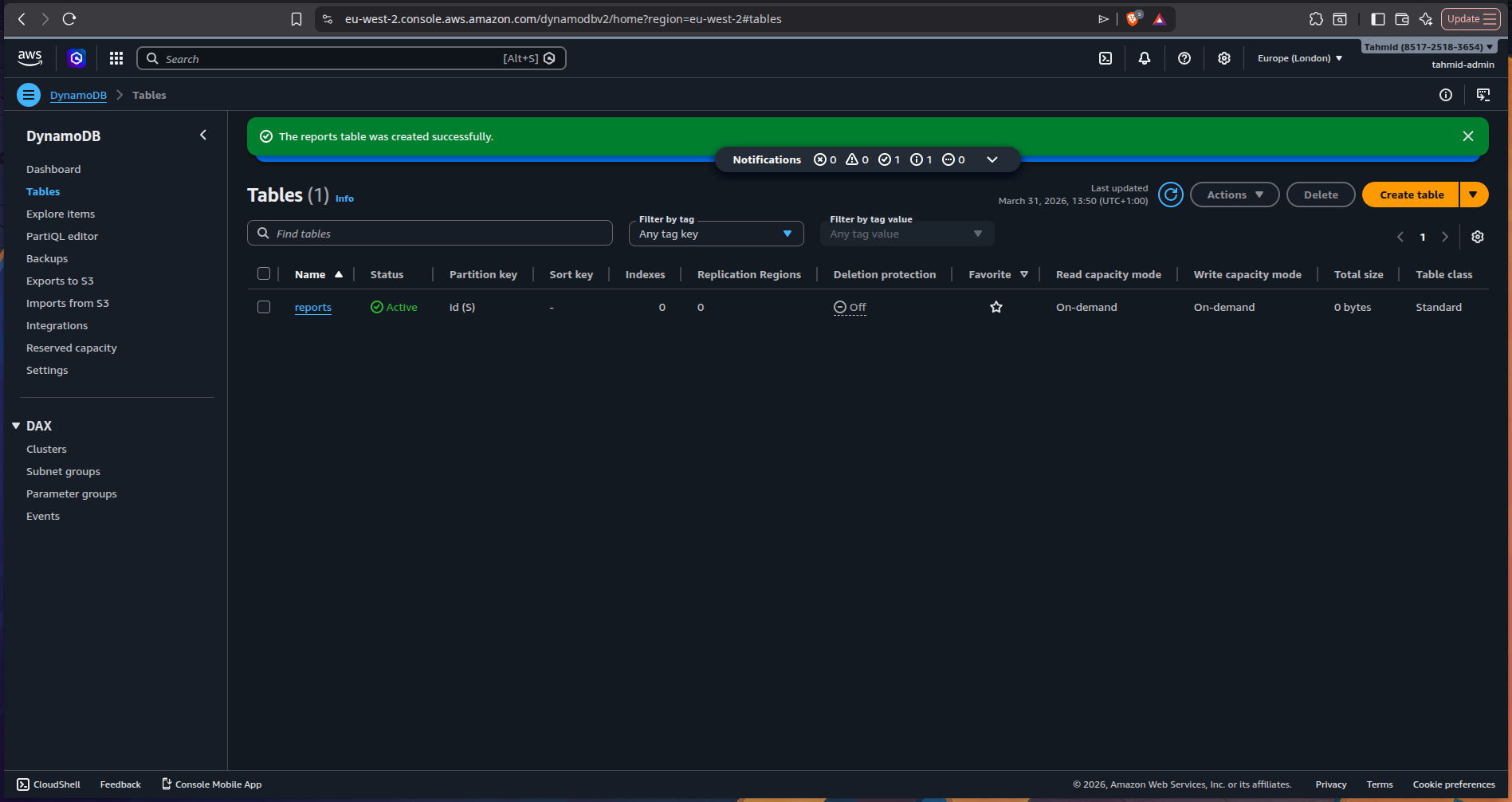
1) Created the DynamoDB table
I started by creating a DynamoDB table to store incident reports.
Each report includes fields such as:
- unique report ID
- timestamp
- service name
- severity
- description
- reporter details
- original payload
This gave me a simple schema for operational event storage while keeping the original payload flexible.
2) Built the Lambda function
I chose Python for the Lambda function to keep the implementation lightweight and easy to reason about.
The function handled two types of requests:
- POST requests for new incident submissions
- GET requests for retrieving stored reports
POST /submit
For incident submission, the Lambda function:
- parsed the request body
- validated the payload
- generated a UUID
- created a UTC timestamp
- flattened useful fields for easier querying later
- stored the report in DynamoDB
A simplified example of the handler logic:
def _handle_post(event: dict) -> dict:
    try:
        payload = _parse_body(event)
    except json.JSONDecodeError as exc:
        logger.warning("Malformed JSON body: %s", exc)
        return _response(400, {"error": "Invalid JSON in request body"})


    errors = _validate(payload)
    if errors:
        logger.warning("Validation failed: %s", errors)
        return _response(400, {"error": "Validation failed", "details": errors})


    report_id = str(uuid.uuid4())
    timestamp = datetime.now(timezone.utc).isoformat()


    item = {
        "id":          report_id,
        "timestamp":   timestamp,
        "payload":     payload,
        "service":     payload.get("service"),
        "severity":    payload.get("severity", "").lower(),
        "description": payload.get("description"),
        "reportedBy":  payload.get("reportedBy"),
    }


    try:
        table.put_item(Item=item)
    except ClientError as exc:
        return _response(502, {"error": "Failed to store report"})


    return _response(201, {
        "message":   "Report submitted successfully",
        "reportId":  report_id,
        "timestamp": timestamp,
    })
One thing I liked about this design was flattening useful top-level fields like service and severity, which would make future querying or indexing much easier.
GET /reports
For report retrieval, the Lambda function scanned the DynamoDB table and returned all stored reports.
It also handled pagination, since DynamoDB scan() only returns up to 1 MB per request.
A simplified example:
def _handle_get() -> dict:
    try:
        result = table.scan()
        items = result.get("Items", [])


        while "LastEvaluatedKey" in result:
            result = table.scan(ExclusiveStartKey=result["LastEvaluatedKey"])
            items.extend(result.get("Items", []))


        return _response(200, {"count": len(items), "reports": items})


    except ClientError as exc:
        return _response(502, {"error": "Failed to retrieve reports"})
This was a useful reminder that even “simple” NoSQL reads often have edge cases like pagination and partial results.
IAM and permissions
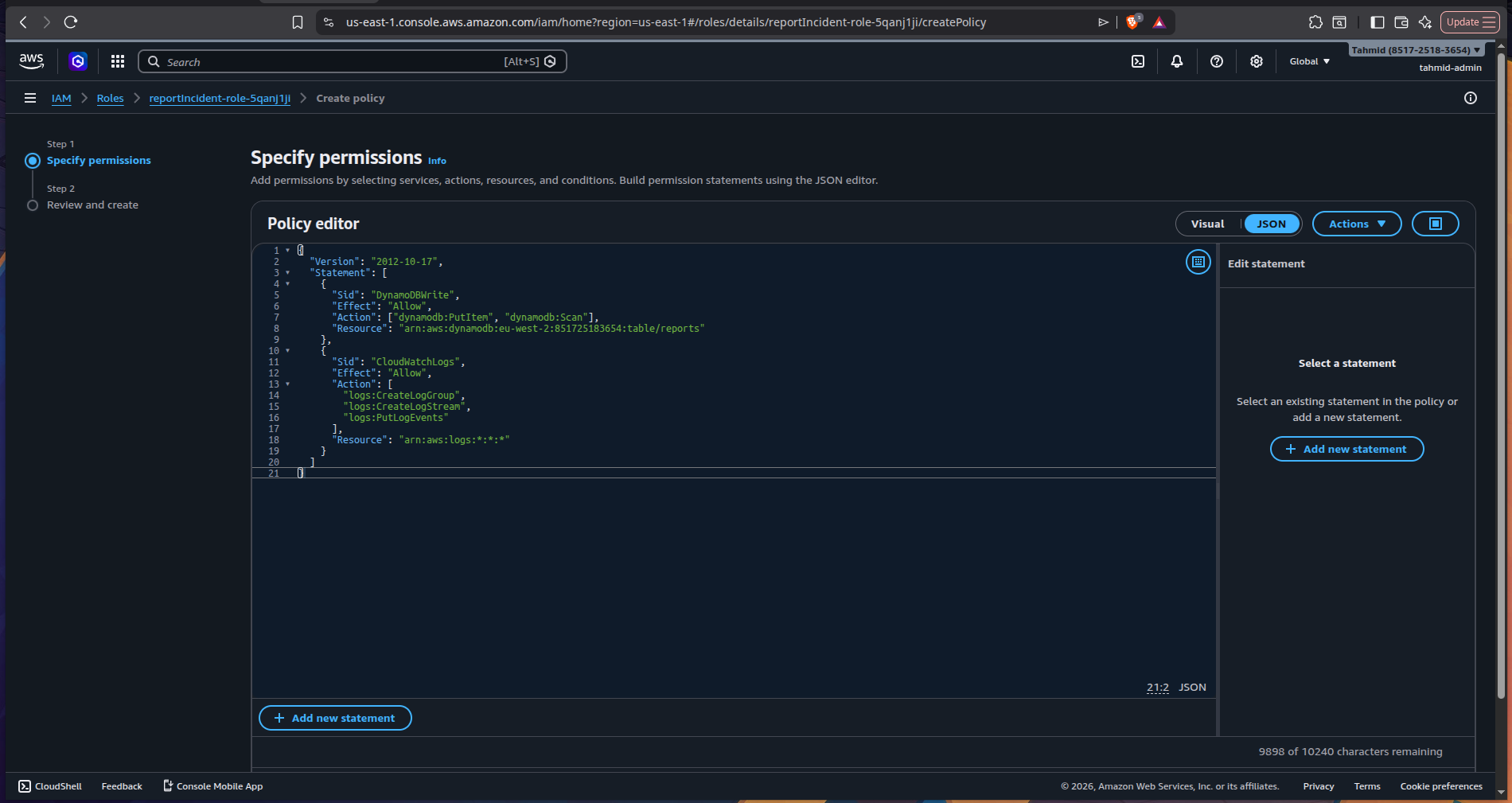
3) Configured least-privilege IAM
The Lambda function needed permission to interact with DynamoDB.
I configured IAM policies so the function could:
- write incident reports
- read incident reports
- write logs to CloudWatch
This was an important part of the project because it reinforced that serverless services don’t automatically have permission to talk to one another - that access has to be explicitly granted.
This also gave me more confidence working with least-privilege IAM, which is one of the most important habits to build in AWS.
Connecting Lambda to the web
4) Exposed the API through API Gateway
Once the Lambda function was working, I used API Gateway to expose it over HTTP.
I created two endpoints:
POST /submitGET /reports
This turned the Lambda function into a public-facing REST API that could be tested from tools like:
curl- Postman
- browser-based frontend clients
Issue I ran into
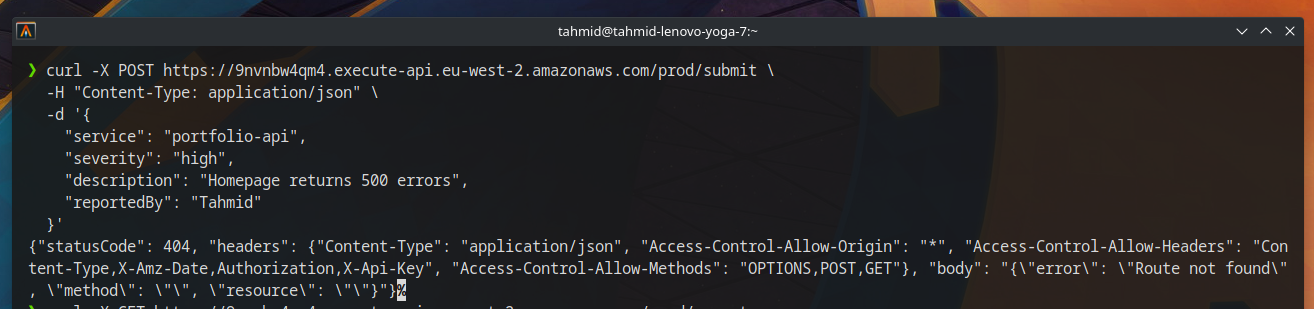
Problem: API requests were failing
After deploying the API, I ran into my first major issue.
I couldn’t successfully send requests to the endpoint and was seeing CORS-related problems and failed request behavior.
Cause
The API Gateway methods were not configured in the right way to properly pass requests through to Lambda.
Fix
After researching the issue, I realised the API methods needed to use Lambda proxy integration.
So I removed the original methods and recreated the endpoints using proxy integration.
Once that was in place, the API started behaving correctly and the Lambda function could successfully:
- receive request data
- write to DynamoDB
- return structured responses
- fetch stored reports
This was one of the most useful lessons in the project, because it showed how easy it is for infrastructure wiring - not just code - to break an otherwise working system.


Testing the API
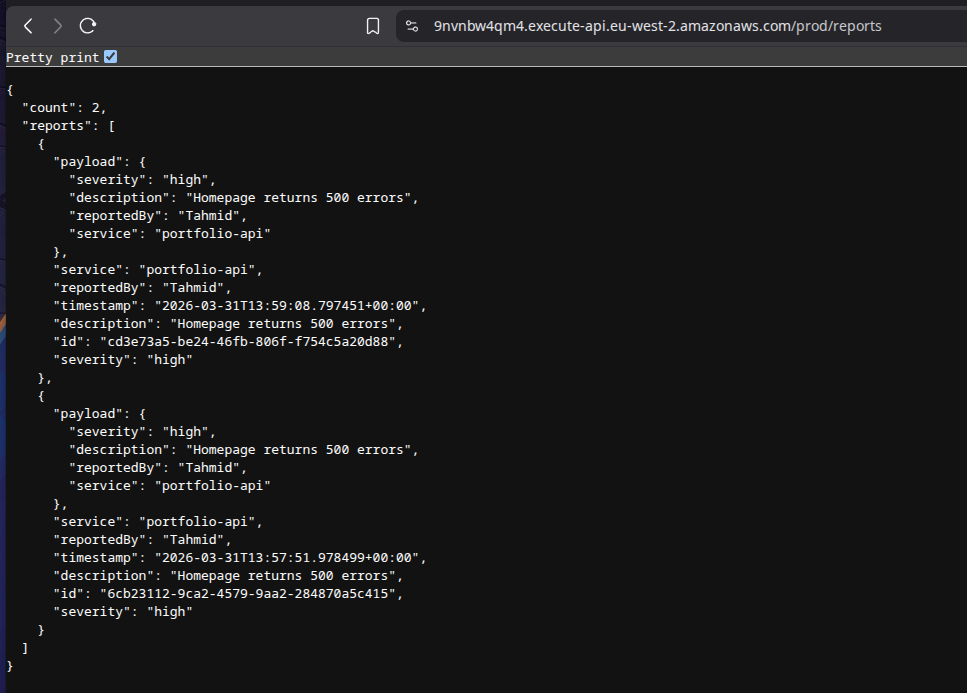
Once the integration was fixed, I verified that the system worked end-to-end by:
- submitting incident reports through the API
- confirming they were stored in DynamoDB
- retrieving them through the GET endpoint
At that point, the system was functioning as intended as a simple serverless backend.
What I learned
This project reinforced several important AWS and backend concepts:
- Lambda functions need explicit IAM permissions to access other AWS services
- API Gateway is what turns Lambda into a usable HTTP API
- Proxy integration matters when passing requests to Lambda
- DynamoDB scans can require pagination
- Validation and error handling matter even in small APIs
- CloudWatch logs are essential for debugging serverless applications
I also learned more about the cost model of serverless services:
Lambda pricing depends on:
- number of invocations
- execution time
- memory allocated
API Gateway pricing depends on:
- number of requests
DynamoDB on-demand pricing depends on:
- read and write usage
That makes this kind of architecture especially attractive for:
- low-traffic workloads
- prototypes
- internal tools
- development environments
Tech stack
- AWS Lambda
- Amazon API Gateway
- Amazon DynamoDB
- AWS IAM
- Amazon CloudWatch
- Python
- REST API
- JSON
Outcome
By the end of the project, I had built a working serverless API that could:
- accept incident reports
- validate incoming payloads
- store data in DynamoDB
- retrieve stored reports through REST endpoints
- run entirely on managed AWS services
This was a great exercise in understanding how to build backend systems without managing infrastructure directly, while still dealing with the kinds of issues that appear in real-world deployments.
I provisioned two EC2 instances across separate Availability Zones and placed them behind an Application Load Balancer to simulate a simple highly available web architecture.
Deployed a static website on AWS using S3, CloudFront, and Route 53 with a custom domain, CDN caching, and serverless hosting.